Best Field Service Software for Fire Contractors in 2026

Table of Contents
What Fire Contractors Need From Field Service Software
NFPA Compliance and Inspection Reporting
Deficiency Tracking and Repair Workflows
Essential Features for Fire Protection Field Service Management
Scheduling and Dispatching Around Code-Mandated Frequencies
Mobile Technician Apps Built for Mechanical Rooms and Risers
Asset Tracking at the Device Level
Inventory Tied to Work Orders, Not Just Warehouse Counts
NFPA Inspection Software: Automating Recurring Compliance
Fire Protection Deficiency Tracking: From Finding to Fix
Low Voltage Contractor ERP: Unifying Field and Financial Operations
How to Choose the Best Field Service Software for Your Fire Contracting Business
Evaluate Against Your Actual Inspection Book, Not a Demo
The Adoption Problem Nobody Talks About
Score Candidates on Fire-Specific Criteria
Ask About the Migration and Onboarding Path
Conclusion
Frequently Asked Questions
Last Updated: September 25, 2026
What Fire Contractors Need From Field Service Software
The best field service software for fire contractors treats an NFPA inspection as a scheduled, repeatable obligation rather than a one-off job. Fire protection work runs on recurring inspections, code-driven documentation, and deficiencies tracked from discovery to repair, none of which a generic dispatch tool handles well.
NFPA Compliance and Inspection Reporting
NFPA compliance is the defining requirement for fire contractors. Inspections must follow the right standard for the system tested, and the report has to stand up to scrutiny from the authority having jurisdiction.
Deficiency Tracking and Repair Workflows
Deficiency tracking is where fire contractors lose money. A failed sprinkler head or blocked exit sign gets written on paper, handed to the office, and sits in a pile until someone remembers to quote the repair.
Watch Out When deficiency repairs live on paper, quotes go out days late and some never go out at all. Contractors lose billable work they already performed the inspection to find.
Essential Features for Fire Protection Field Service Management
Fire protection field service management is not general dispatch with a fire icon on the login screen. The work is driven by code-mandated inspection frequencies, device-level test results, and deficiencies that convert into billable repairs. The features below are the ones fire contractors use daily, and the ones that fall short on platforms built for other trades.
Fire protection technician using field service software on a tablet to log inspections in a mechanical room
Scheduling and Dispatching Around Code-Mandated Frequencies
Scheduling in fire protection starts with the frequency, not the customer request. A wet-pipe sprinkler system under NFPA 25 is on an annual inspection with quarterly and monthly visual checks; a fire alarm system under NFPA 72 has its own intervals by device type; a kitchen hood suppression system is semi-annual. The software has to hold those frequencies against the asset and generate the next work order automatically, or a dispatcher rebuilds the same schedule every quarter by hand.
Mobile Technician Apps Built for Mechanical Rooms and Risers
The mobile app is the make-or-break piece. Technicians work in mechanical rooms, riser closets, parking garages, and above-ceiling spaces where signal is unreliable. If the app requires a live connection to save a form, adoption dies the first week.
Asset Tracking at the Device Level
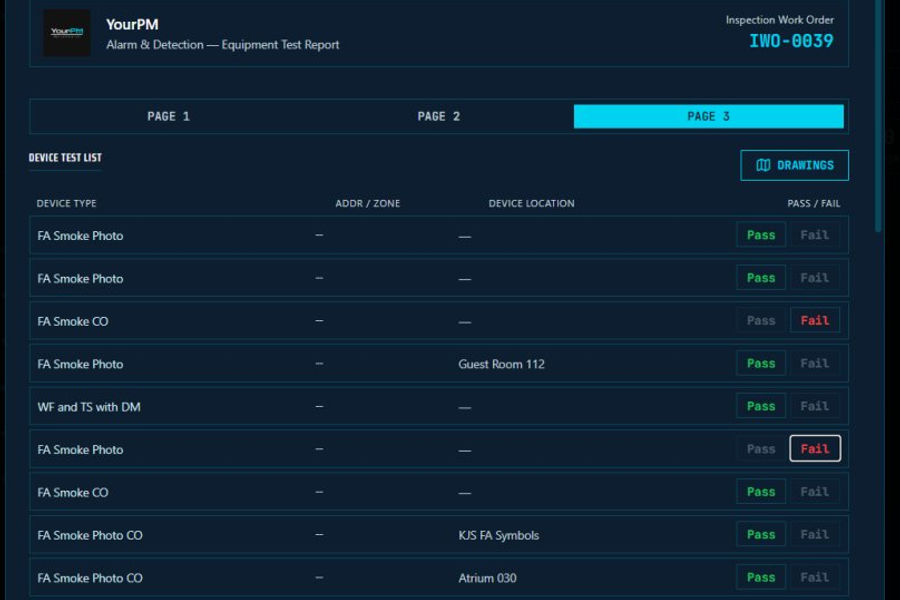
Asset tracking in fire protection means every device, sprinkler head, smoke detector, pull station, backflow assembly, is a record with a location, manufacturer, install date, and service history. When a technician scans a fire alarm panel, the system should pull up prior test results, the device inventory behind that panel, and any open deficiencies.
Inventory Tied to Work Orders, Not Just Warehouse Counts
Inventory management keeps truck stock and warehouse parts accurate, but the fire-specific version ties parts to work orders. When a technician replaces a failed sprinkler head or a backflow assembly, the part should come off truck stock against that work order, not get written on a slip and reconciled later.
Key Takeaway The features that separate a fire-specific platform from a repurposed FSM tool are the ones tied to code: frequency-driven scheduling, system-specific inspection forms, device-level asset history, and parts consumed against the work order.
NFPA Inspection Software: Automating Recurring Compliance
NFPA inspection software automates recurring compliance by generating the next inspection from the last one completed. Instead of a manager rebuilding a schedule every quarter, the system holds the frequency and creates the work order when it comes due.
What Breaks Without Automation | What Automation Fixes | Who Feels It |
Missed renewal dates | Auto-generated inspection work orders | Operations managers |
Manual report assembly | Digital forms tied to NFPA standards | Field technicians |
Paper deficiency logs | Repair tickets created in the field | Office and accounting |
Fire Protection Deficiency Tracking: From Finding to Fix
Fire protection deficiency tracking follows a deficiency from discovery to invoiced repair. Each step should happen in one system, with the customer able to see status along the way.
A workable flow looks like this:
Technician logs the deficiency with photos and location during inspection
System generates a repair ticket and a quote for the customer
Customer approves, and the repair is scheduled
Parts are pulled from inventory against the work order
Repair is completed, signed off digitally, and invoiced
Pro Tip Attach photos to every deficiency at the point of discovery. It eliminates the callback trip to verify what the technician saw and speeds up customer approval.
Low Voltage Contractor ERP: Unifying Field and Financial Operations
A low voltage contractor ERP connects field operations to the financial side of the business. When field data and accounting live in separate systems, job costing becomes guesswork.
How to Choose the Best Field Service Software for Your Fire Contracting Business
Choosing the best field service software for a fire contracting business comes down to fit with NFPA workflows, the mobile experience in real buildings, and whether the platform connects field work to accounting. The framework below is the one most contractors skip, and the one that predicts whether the software is still in use a year later.
Evaluate Against Your Actual Inspection Book, Not a Demo
A common mistake is evaluating software on the sales demo instead of a real inspection day. Ask to see the technician view, not the dashboard, then bring your own data: pull three real jobs from last quarter, a routine annual sprinkler inspection, a fire alarm test with a deficiency, and a reactive service call, and walk each through the candidate system end to end.
Watch for these specific failure points:
Does the system hold the inspection frequency against the asset, or does someone re-enter it every cycle?
Does the inspection form match the system type, or does the technician pick from a generic checklist?
Does a failed test point generate a deficiency record with photos and location automatically?
Does that deficiency convert into a quote without re-keying?
Does the completed repair post parts and labor to the job cost?
The Adoption Problem Nobody Talks About
The single biggest reason field service software fails at a fire contractor is not features. It is that the field crew never adopts it. Technicians who have run paper inspections for fifteen years are not resistant because they are difficult. They are resistant because the software slows them down on a job they already know how to do.
A few patterns that improve adoption:
Pilot with your most skeptical technician, not your most enthusiastic one. If the skeptic can complete an inspection faster than on paper, the rest of the crew follows.
Run paper and digital in parallel for one inspection cycle. It costs a little time up front and surfaces every gap before the crew is committed.
Load the asset list before the first inspection. A technician who has to build the device list from scratch on day one will abandon the app.
Train on the technician's own building, not a sample job. Familiarity removes the excuse that the software does not fit real work.
Measure time-to-complete on the first ten inspections. If it is not trending down by inspection ten, the form or the app is the problem, not the technician.
Pro Tip Assign one field technician as the internal champion and give that person direct input on form layout. Crews adopt tools faster when a peer shaped them.
Score Candidates on Fire-Specific Criteria
Use this checklist before committing. Each item should be demonstrated live, not described in a brochure:
Inspection forms map to NFPA 13, 25, and 72 requirements by system type
Recurring inspections generate automatically from asset service history
Deficiency tracking creates repair tickets and quotes in the field
Mobile app works offline and syncs when signal returns
Asset tracking shows device-level service history across inspection cycles
Parts are consumed against work orders, not just warehouse counts
Accounting is native, not a bolted-on integration
Onboarding does not require a lengthy data migration project
Ask About the Migration and Onboarding Path
The last question is the one vendors answer vaguely: how does our existing inspection history get into the system? Contractors with years of paper records and a spreadsheet of renewal dates need a realistic path, not a promise. Ask what the vendor does with historical inspection data, how long onboarding takes for a crew of your size, and who owns the setup.
Conclusion
Fire contractors need software that treats compliance, recurring inspections, and deficiency repairs as connected parts of one workflow, not separate tasks scattered across apps. The platforms that fit best are built for fire protection and life safety work specifically, where NFPA tracking and field-to-office data flow are native rather than improvised. Contractors evaluating options should weigh inspection automation, mobile usability, and integrated accounting above feature count.
Frequently Asked Questions
What features are essential for fire protection field service software?
Fire contractors need NFPA-compliant inspection forms, automated deficiency tracking, and recurring maintenance scheduling. Mobile apps with offline capability keep technicians productive in the field. Look for integrated invoicing, asset tracking by location, and real-time GPS dispatching. Unlike general field service software, fire-specific platforms handle inspection codes for sprinklers, alarms, and extinguishers without workarounds.
How does NFPA inspection software improve recurring compliance workflows?
NFPA inspection software automates the scheduling of annual, semi-annual, and quarterly inspections based on each system's requirements. It generates digital inspection forms with code references, captures deficiencies with photos, and creates repair quotes automatically. This eliminates manual tracking spreadsheets and reduces missed inspections that lead to compliance gaps and lost recurring revenue.
Why is native accounting integration important for fire protection contractors?
Native accounting with a double-entry ledger connects field work directly to job costing and invoicing. When a technician completes an inspection and logs a deficiency, the system can generate a repair quote and invoice without duplicate data entry. This real-time financial visibility helps contractors track profitability per job, manage cash flow, and avoid the errors that come from syncing separate systems.
How do I choose the best software for life safety and low voltage contractors?
Start by mapping your specific workflows: NFPA inspections, deficiency repairs, low voltage installations, and service agreements. Prioritize platforms built for your industry rather than generic tools. Test mobile app usability with your technicians, verify compliance reporting meets local AHJ requirements, and confirm the system handles both project work and recurring maintenance. Request a free trial to validate fit before committing.


Comments